Ease Once, Apply Everywhere: Easing with Lambdas
Prerequisites: the samples lean on lambdas (the
{|t| ...}closures), thesmoothstepprimer, and layers without introducing them. The curves themselves are documented in the stdlib's Easing section.
The one idea
Every example below rests on one idea: an easing curve is a function that
takes t and hands back a reshaped t.
Picture t as a slider you drag at a steady speed from 0 to 1. Under the
slider sits a cam — a shaped wheel. The slider turns it at a constant rate,
and the cam's profile decides how fast the thing riding on it rises: slowly
and then in a rush, quickly and then settling, or past the top and back
down. The cam is the easing curve. Swap the cam and everything riding on it
changes character; the slider never notices.
One correction for anyone arriving from CSS: here the curves shape
space, not time. Nothing animates. t is a loop counter divided by its
last value, and the cam decides where the twelfth dot lands, how wide the
stroke is at its midpoint, which color a strip gets. The same handle
numbers you would give a transition end up describing a still picture.
In Pathogen a cam is a lambda:
let smooth = {|t| cubicBezier(0.42, 0, 0.58, 1, t)};
let bounce = {|t| ease(Easing.BounceOut, t)};
Two functions make the cams. cubicBezier takes the same four handle
numbers a CSS cubic-bezier() takes — paste them from a stylesheet or a
curve tool — and then t. ease takes a named curve from the Easing
family (Easing.SineInOut, Easing.BackOut, Easing.ElasticOut,
Easing.BounceIn, and twenty-two more) and then t. The older trio
easeIn/easeOut/easeInOut and smoothstep(0, 1, t) are cams too.
Whichever you pick, the lambda names it once; from then on your code just
says smooth(t).
Four things worth knowing before the pictures:
- Two families leave the box.
backandelasticreturn values below 0 and above 1 — that is their whole point — and so doescubicBezierwhen ayhandle sits outside 0..1. Nothing clamps them. If the number is about to become an opacity, a radius, or anything that cannot go negative, clamp it yourself:clamp(back(t), 0, 1). - The
xhandles are checked.cubicBezierrefusesx1orx2outside 0..1 with a compile error, because such a curve would double back on itself. Curve tools never produce one, but a typo can. tis clamped for you byeaseandcubicBezier: anything below 0 reads as 0 and anything above 1 as 1, with no extrapolation past the ends. A cam you write by hand, like the{|t| t}in Example 1, clamps nothing.- Lambdas take exactly the arguments they declare. A cam is
{|t| ...}and is called with one number. When you need the same shape with different numbers, a factory returns a lambda with those numbers baked in (Example 5); calling the cam with extra arguments is an error.
Every sample below is live: the code panel is read-only, but the "Open in playground workspace" button in each one drops the sample into an editor where the handle numbers can be changed and the picture recompiles.
Example 1 — Five cams
The bare mechanism. Five lambdas, each plotted over t from 0 to 1. The
dashed box is the 0..1 range; the line is where each cam sends t.
//-- Five easing curves plotted side by side. Each one is a lambda that
//-- takes t and hands back a reshaped t: the box is the 0..1 range, the
//-- line is where the curve sends each t. The last two leave the box.

define ViewBox(0, 0, 400, 200);

let linear = {|t| t};
let quad = {|t| easeInOut(t)};
let cssInOut = {|t| cubicBezier(0.42,
    0,
    0.58,
    1,
    t)};
let back = {|t| ease(Easing.BackOut, t)};
let elastic = {|t| ease(Easing.ElasticOut, t)};

let curves = [
  linear,
  quad,
  cssInOut,
  back,
  elastic,
];
let names = [
  'linear',
  'easeInOut',
  'cubicBezier',
  'BackOut',
  'ElasticOut',
];

let plotW = 60;
let plotH = 90;
let gap = 14;
let baseline = 150;

let boxes = PathLayer('boxes') #{
  stroke: oklch(0.82 0.02 260);
  stroke-width: 0.5;
  stroke-dasharray: 3 4;
  fill: none;
};
let lines = PathLayer('curves') #{
  stroke: oklch(0.58 0.19 350);
  stroke-width: 1.5;
  stroke-linejoin: round;
  fill: none;
};
let labels = TextLayer('labels') #{
  font-family: system-ui, sans-serif;
  font-size: 8;
  letter-spacing: 0.5;
  fill: #8a93a6;
  text-anchor: middle;
};

for (col in 0..4) {
  let x0 = 25 + col * (plotW + gap);
  let shape = curves[col];
  boxes.apply {
    rect(x0,
        calc(baseline - plotH),
        plotW,
        plotH);
  }
  lines.apply {
    M x0 baseline
    for (i in 1..96) {
      let t = i / 96;
      L calc(x0 + plotW * t) calc(baseline - plotH * shape(t))
    }
  }
  labels.apply {
    text(calc(x0 + plotW / 2), 170)`${names[col]}`;
  }
}
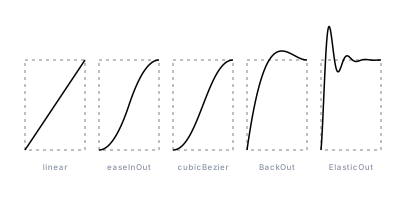
Read the first three as one family: the straight line is the slider, and
the two S-curves bend it so the ride starts slow and ends slow. The last
two are the ones to remember for later: BackOut overshoots the top and
comes back; ElasticOut overshoots and wobbles before it settles. Both are
one line of code and both really do go past 1.
The array of lambdas is doing quiet work here. curves[col] picks a cam,
let shape = curves[col]; names it, and shape(t) calls it — the loop body
never knows which curve it is drawing.
Example 2 — Ranges
An eased t is only useful once it moves something. The simplest something
is a range: lerp(start, end, smooth(t)) slides a value from start to
end along the cam. And because smooth(t) is just a number between 0
and 1, everything else that takes a ratio accepts it too.
//-- One eased t, three ranges. Top row: nine dots placed by bare t. Bottom
//-- row: the same dots placed by smooth(t), and the SAME smooth(t) also
//-- picks each dot's color (blue to pink) and radius (2 to 5). Change the
//-- four handle numbers once and all three channels follow.

define ViewBox(0, 0, 400, 170);

let smooth = {|t| cubicBezier(0.42,
    0,
    0.58,
    1,
    t)};

let left = 40;
let right = 360;
let blue = Color(0.55, 0.16, 260);
let pink = Color(0.62, 0.19, 350);

let labels = TextLayer('labels') #{
  font-family: system-ui, sans-serif;
  font-size: 10;
  letter-spacing: 0.5;
  fill: #8a93a6;
};
labels.apply {
  text(left, 34)`x = lerp(left, right, t)`;
  text(left, 100)`x = lerp(left, right, smooth(t))`;
  text(left, 113)`fill = blue.mix(pink, smooth(t)) · r = lerp(2, 5, smooth(t))`;
}

let plain = PathLayer('plain') #{
  fill: oklch(0.55 0.16 260);
  stroke: none;
};
plain.apply {
  for (i in 0..8) {
    let t = i / 8;
    circle(calc(lerp(left, right, t)), 54, 4);
  }
}

let eased = GroupLayer('eased') #{};
for (i in 0..8) {
  let t = i / 8;
  let along = smooth(t);
  let tint = blue.mix(pink, along);
  let dot = PathLayer(`eased-${i}`) #{
    fill: tint;
    stroke: none;
  };
  dot.apply {
    circle(calc(lerp(left, right, along)), 138, calc(lerp(2, 5, along)));
  }
  eased.append(dot);
}
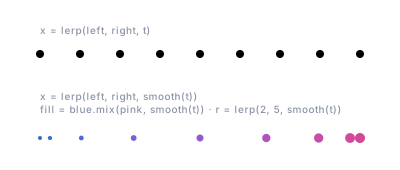
One lambda drives three channels — position through lerp, color through
blue.mix(pink, ...), radius through another lerp — and they move in
sync because they share one number. Change the four handle numbers in
smooth and all three follow. That is the practical payoff of naming the
cam: the tuning lives in one place.
It is also where the first gotcha bites. The radius channel is
lerp(2, 5, smooth(t)), which only stays between 2 and 5 while smooth
stays inside the box. Swap in back or elastic and the smallest dots go
negative — so a radius, an opacity, or a stroke width driven by an
overshooting cam wants clamp(..., 0, 1) around the eased value.
Example 3 — Amplitudes
Position is the obvious thing to ease. Amplitude is the next one: how big
a wave is. Each row below is mid - amplitude(t) * sin(TAU() * cycles * t)
with three full cycles, and only amplitude changes.
//-- Amplitude is just another number an eased t can drive. Three waves,
//-- same three cycles each. Top: a fixed amplitude of 18. Middle: the
//-- amplitude eases in with sine-in, so the wave grows from nothing.
//-- Bottom: a window (smoothstep up, smoothstep down) fades it in and out.

define ViewBox(0, 0, 400, 250);

let left = 40;
let width = 320;
let cycles = 3;

let fixed = {|t| 18};
let growing = {|t| 18 * ease(Easing.SineIn, t)};
let windowed = {|t| 18 * smoothstep(0, 0.35, t) * smoothstep(1, 0.65, t)};

let envelopes = [
  fixed,
  growing,
  windowed,
];
let captions = [
  'amplitude = 18',
  'amplitude = 18 * ease(Easing.SineIn, t)',
  'amplitude = 18 * smoothstep(0, 0.35, t) * smoothstep(1, 0.65, t)',
];

let labels = TextLayer('labels') #{
  font-family: system-ui, sans-serif;
  font-size: 9;
  letter-spacing: 0.5;
  fill: oklch(0.45 0.02 260);
};
let scene = GroupLayer('scene') #{};

for (row in 0..2) {
  let mid = 58 + row * 76;
  let amplitude = envelopes[row];
  let guide = PathLayer(`baseline-${row}`) #{
    stroke: oklch(0.82 0.02 260);
    stroke-width: 0.5;
    stroke-dasharray: 3 4;
    fill: none;
  };
  guide.apply {
    M left mid
    L calc(left + width) mid
  }
  let wave = PathLayer(`wave-${row}`) #{
    stroke: oklch(0.58 0.19 350);
    stroke-width: 1.5;
    stroke-linejoin: round;
    fill: none;
  };
  wave.apply {
    M left mid
    for (i in 1..96) {
      let t = i / 96;
      L calc(left + width * t) calc(mid - amplitude(t) * sin(TAU() * cycles * t))
    }
  }
  labels.apply {
    text(left, calc(mid - 26))`${captions[row]}`;
  }
  scene.append(guide, wave);
}
scene.append(labels);
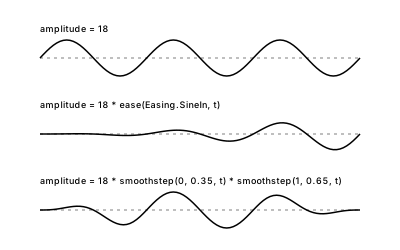
The middle row is 18 * ease(Easing.SineIn, t): the wave starts silent and
swells. The bottom row multiplies two smoothsteps — the plateau idiom
from the primer — so the wave is silent at both
ends and full in the middle. Whatever you multiply into an eased t
becomes that thing's envelope: a second shape that scales the first one
from end to end.
Example 4 — Cycles and half-cycles
A wave needs a count as well as a size. sin(TAU() * cycles * t) runs
cycles whole waves across the range. Counting in half-cycles instead,
sin(PI() * halfCycles * t), counts lobes: one bulge, two, three, four.
//-- Cycles and half-cycles. Every row is lerp(start, end, t) with a sine
//-- offset, sin(PI() * halfCycles * t), riding on it. Counting half-cycles
//-- means counting lobes: one lobe, two, three, four. Whole cycles can only
//-- give an even number, and any whole count of half-cycles lands back on
//-- the guide line at t = 1.

define ViewBox(0, 0, 400, 300);

let left = 40;
let right = 296;
let amplitude = 14;
let rowNames = [
  '1 half-cycle',
  '2 half-cycles',
  '3 half-cycles',
  '4 half-cycles',
];

let labels = TextLayer('labels') #{
  font-family: system-ui, sans-serif;
  font-size: 9;
  letter-spacing: 0.5;
  fill: #8a93a6;
};
let scene = GroupLayer('scene') #{};

for (halfCycles in 1..4) {
  let top = 32 + (halfCycles - 1) * 60;
  let bottom = top + 36;
  let wave = {|t| lerp(bottom, top, t) - amplitude * sin(PI() * halfCycles * t)};
  let guide = PathLayer(`guide-${halfCycles}`) #{
    stroke: oklch(0.82 0.02 260);
    stroke-width: 0.5;
    stroke-dasharray: 3 4;
    fill: none;
  };
  guide.apply {
    M left bottom
    L right top
  }
  let trace = PathLayer(`wave-${halfCycles}`) #{
    stroke: oklch(0.58 0.19 350);
    stroke-width: 1.5;
    stroke-linejoin: round;
    fill: none;
  };
  trace.apply {
    M left bottom
    for (i in 1..96) {
      let t = i / 96;
      L calc(lerp(left, right, t)) calc(wave(t))
    }
  }
  labels.apply {
    text(calc(right + 10), calc(top + 4))`${rowNames[halfCycles - 1]}`;
  }
  scene.append(guide, trace);
}

labels.apply {
  text(left, 282)`y = lerp(bottom, top, t) - ${amplitude} * sin(PI() * halfCycles * t)`;
}
scene.append(labels);
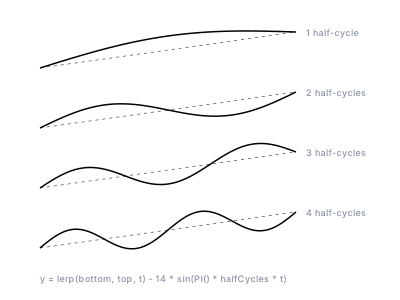
Two things the rows show. Every whole number of half-cycles lands the wave
back on its guide line at t = 1, so the shape always arrives cleanly. And
odd counts give an odd number of lobes — up, down, up — which whole cycles
can never do. That is why half-cycles is the natural unit when you are
drawing a shape rather than timing a loop.
The rows are also the standard recipe for "go from here to there, wobbling
on the way": a lerp for the journey, plus an offset for the wobble. Ease
the lerp's t and the journey itself gets a cam; ease the amplitude and
the wobble gets an envelope. They stay independent.
Example 5 — Factories
When the same shape is needed with different numbers, write a fn that
returns the lambda. The returned lambda keeps the numbers it was built
with, so makeWave(12, 5) is a wave you call with just t, and
makeEase(0.34, 1.56, 0.64, 1) is a cam with its handles baked in.
//-- Factories: a fn that returns a lambda. The lambda captures the numbers
//-- it was built with, so makeWave(12, 5) is a wave you can call with just
//-- t, and makeEase(0.34, 1.56, 0.64, 1) is a curve with its handles baked
//-- in. Three waves from one factory, one overshooting dot row from the
//-- other: the dashed tick is the 1.0 mark the dots pass and come back to.

define ViewBox(0, 0, 400, 250);

fn makeWave(amplitude, halfCycles) {
  return {|t| amplitude * sin(PI() * halfCycles * t)};
}

fn makeEase(x1, y1, x2, y2) {
  return {|t| cubicBezier(x1,
      y1,
      x2,
      y2,
      t)};
}

let gentle = makeWave(8, 1);
let ripple = makeWave(12, 5);
let flutter = makeWave(6, 9);
let backOut = makeEase(0.34, 1.56, 0.64, 1);

let left = 40;
let width = 320;
let mark = 300;

let labels = TextLayer('labels') #{
  font-family: system-ui, sans-serif;
  font-size: 9;
  letter-spacing: 0.5;
  fill: #8a93a6;
};
let scene = GroupLayer('scene') #{};

let wavesMade = [
  gentle,
  ripple,
  flutter,
];
let names = [
  'makeWave(8, 1)',
  'makeWave(12, 5)',
  'makeWave(6, 9)',
];

for (row in 0..2) {
  let mid = 46 + row * 52;
  let wave = wavesMade[row];
  let guide = PathLayer(`baseline-${row}`) #{
    stroke: oklch(0.82 0.02 260);
    stroke-width: 0.5;
    stroke-dasharray: 3 4;
    fill: none;
  };
  guide.apply {
    M left mid
    L calc(left + width) mid
  }
  let trace = PathLayer(`wave-${row}`) #{
    stroke: oklch(0.58 0.19 350);
    stroke-width: 1.5;
    stroke-linejoin: round;
    fill: none;
  };
  trace.apply {
    M left mid
    for (i in 1..96) {
      let t = i / 96;
      L calc(left + width * t) calc(mid - wave(t))
    }
  }
  labels.apply {
    text(left, calc(mid - 18))`${names[row]}`;
  }
  scene.append(guide, trace);
}

labels.apply {
  text(left, 196)`makeEase(0.34, 1.56, 0.64, 1): past the mark, then back`;
}
let tick = PathLayer('mark') #{
  stroke: oklch(0.82 0.02 260);
  stroke-width: 0.5;
  stroke-dasharray: 3 4;
  fill: none;
};
tick.apply {
  M calc(left + mark) 204
  L calc(left + mark) 228
}
let dots = PathLayer('dots') #{
  fill: none;
  stroke: oklch(0.55 0.16 260);
  stroke-width: 1;
};
dots.apply {
  for (i in 0..10) {
    let t = i / 10;
    circle(calc(left + mark * backOut(t)), 216, 3);
  }
}
scene.append(labels, tick, dots);
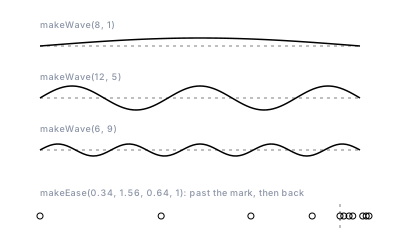
Those four handle numbers are the standard cubic-bézier fit of back-out —
the same shape Example 1 drew with ease(Easing.BackOut, t), reached by
the other route. The two are close, not identical: one is a formula, the
other a curve fitted to it, and either works as a cam.
Return a lambda, not a named fn. A named fn looks up free names where
it is called; a lambda captures them where it is made, which is what
lets amplitude and halfCycles travel inside the returned value. The
lambdas post covers that difference in
detail.
Example 6 — A plume
Everything at once. Twelve strands fan out from one point. The fan's
spread is ease(Easing.BackInOut, strandT), which bunches the strands
toward the middle and sends the ones just inside the edges past their
outer neighbors, so the tips cross before they settle. Each strand's wave
amplitude rides a smoothstep window so it is silent at both ends; its
lobe count is a small number of half-cycles; and its color is mixed by the
same strand t that placed it.
//-- A plume: twelve strands fanning out from one point. Everything in it
//-- is an eased t. The fan's spread uses back-in-out: strands bunch toward
//-- the middle, and the ones just inside the edges push past their outer
//-- neighbors before the tips settle. Each strand's wave amplitude rides a
//-- smoothstep window (silent at both ends), its lobe count is a small
//-- number of half-cycles, and its color is mixed by the same strand t.

define ViewBox(0, 0, 400, 260);

let originX = 40;
let originY = 130;
let tipX = 360;

let spread = {|strandT| ease(Easing.BackInOut, strandT)};
let advance = {|t| ease(Easing.SineOut, t)};
let envelope = {|t| smoothstep(0, 0.3, t) * smoothstep(1, 0.7, t)};
let blue = Color(0.5, 0.15, 260);
let pink = Color(0.65, 0.19, 350);

let plume = GroupLayer('plume') #{};
for (strandIndex in 0..11) {
  let strandT = strandIndex / 11;
  let tipY = lerp(210, 50, spread(strandT));
  let halfCycles = 1 + strandIndex % 3;
  let amplitude = 10 + 6 * (strandIndex % 2);
  let tint = blue.mix(pink, strandT);
  let strand = PathLayer(`strand-${strandIndex}`) #{
    stroke: tint;
    stroke-width: 1.25;
    stroke-linecap: round;
    stroke-linejoin: round;
    fill: none;
  };
  strand.apply {
    M originX originY
    for (i in 1..80) {
      let t = i / 80;
      let strandX = lerp(originX, tipX, advance(t));
      let strandY = lerp(originY, tipY, t) + amplitude * envelope(t) * sin(PI() * halfCycles * t);
      L calc(strandX) calc(strandY)
    }
  }
  plume.append(strand);
}

let seed = PathLayer('seed') #{
  fill: oklch(0.35 0.02 260);
  stroke: none;
};
seed.apply {
  circle(originX, originY, 3);
}
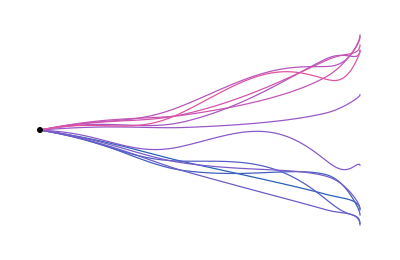
There is no new mechanism in this picture. It is Example 2's range, Example 3's envelope and Example 4's half-cycles, each fed by a named cam. That is the habit the post is arguing for: name the curve once, then let it drive whichever numbers the picture needs.
Where to go next
- Open any sample above in the playground and swap one cam for another:
Easing.BounceOutinto the plume's spread, an elastic curve into the ranges row. The whole point is that nothing else has to change. - The Easing reference has the full family table and
a paste-ready list of
cubicBezierhandle values for the classic curves. - The same names drive
TopoGradient.easing, where the eased elevation is clamped onto the color ramp. bumpis a hill built from the same easing idea, handy when an envelope should peak somewhere specific.- Lambdas come to Pathogen for the closure rules that make the factories in Example 5 work.