Name Your Corners: Segment Labels and Corner Suffixes
A path used to be something you could only write. As of this release, it's something you can address.
Two small clauses now attach to any path command. as gives an edge or a vertex a name. with attaches a fillet or chamfer to the joint a command creates, right where you draw it:
M 10 10
h 60 as segment('lid');
v 40 with fillet(8) as endpoint('corner');
h -60;
And everything you name can be looked up later — segment('lid') returns that edge with the full sampling API, point('corner') returns the vertex as a drawTo-ready Point, and vertex('corner') returns a handle that can round or cut that specific joint. The full reference lives in the Segment Labels & Corner Suffixes docs; this post is about why the feature exists and what it unlocks.
Rounding a corner where you draw it
Before this release, rounding one corner mid-path meant doing the trigonometry yourself: shorten the incoming edge, thread a tangentArc between the edges, shorten the outgoing edge. The authored code stops looking like the shape you meant.
// before: the 60×60 corner, hand-assembled from three pieces
let manual = @{
  h 45
  tangentArc(15, 0.5pi);
  v 45
};

// after: write the edges you mean, name the rounding where it happens
let suffixed = @{
  h 60
  v 60 with fillet(15)
};
define ViewBox(0, 0, 240, 120);
define default PathLayer('shapes') #{ stroke: #334155; stroke-width: 2.5; fill: none; }

// BEFORE: rounding a corner by hand means re-computing both edge
// lengths and threading a tangent arc between them.
let manual = @{
  h 45
  tangentArc(15, 0.5pi);
  v 45
};
manual.drawTo(30, 25);

// AFTER: write the edges you mean, name the rounding where it happens.
let suffixed = @{
  h 60
  v 60 with fillet(15)
};
suffixed.drawTo(150, 25);

The two are exactly equivalent: fillet(15) trims 15 units off each 60-unit edge, which is precisely the 45 the hand-built version has to write out — except now the compiler does that arithmetic, not you.
The suffix form is recorded at definition and applied at finalization — the same trim-and-splice machinery as the post-hoc fillet methods, just addressed by adjacency instead of index. Your authored extents stay intact: ctx.position mid-path still reflects the sharp corner you wrote, and the trimming happens when the path block closes or the layer emits. with chamfer(d) and with ellipticalFillet(rx, ry) work the same way.
There's a design lesson hiding in the syntax. Our first sketch was v 20 joinPreviousWithFillet(5) — a function-call suffix. It read badly because a fillet isn't a property of an edge; it's a property of the joint between two edges. Every system that solved this before us — PostScript's arct operator, TikZ's rounded corners, CSS's per-corner border-radius — attaches rounding to the corner. with fillet(...) names the operation on the joint the command creates, and the clunkiness disappears.
Labels turn paths into structures
The deeper change is as. SVG path data is a 1999-era pen-plotter stream — single-letter opcodes and coordinates, no names, no structure. Everything Pathogen does ultimately compiles down to that stream, but you shouldn't have to think in it.
let card = @{
  h 160 as segment('lid');
  v 80 with fillet(22);
  h -160 with chamfer(14);
  z
};
'lid' names the top edge. That name survives everything that happens to the path — fillets trimming it, projection moving it — and it answers questions:
define ViewBox(0, 0, 240, 140);
define default PathLayer('card') #{ stroke: #334155; stroke-width: 2.5; fill: none; }
define PathLayer('studs') #{ fill: #7c3aed; }

// Name the lid while drawing it...
let card = @{
  h 160 as segment('lid');
  v 80 with fillet(22);
  h -160 with chamfer(14);
  z
};
card.drawTo(40, 30);

// ...then decorate evenly along just that named edge.
layer('studs').apply {
  let lid = card.segment('lid');
  for (op in lid.partition(6)) {
    circle(40 + op.point.x, 22, 3);
  }
}
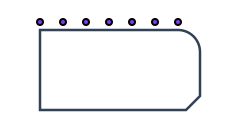
segment('lid') hands back the labeled range as a real PathBlock, so partition, get, tangent, normal, and boundingBox all work on just that edge. No index arithmetic, no measuring where the lid starts and stops.
Vertices work the same way. as endpoint('name') names the point a command lands on, and point('name') retrieves it — an anchor that follows the geometry instead of a hand-computed coordinate:
define ViewBox(0, 0, 240, 140);
define default PathLayer('bracket') #{ stroke: #334155; stroke-width: 2.5; fill: none; }
define PathLayer('bolts') #{ fill: none; stroke: #0d9488; stroke-width: 2.5; }

// Name the two mounting corners as the bracket is drawn.
let bracket = @{
  h 150 as endpoint('mount-east');
  v 70;
  h -150 as endpoint('mount-west');
  z
};
let placed = bracket.drawTo(45, 35);

// Bolt heads anchor to the NAMED corners — no hand-computed coordinates,
// and they follow automatically if the bracket's extents change.
layer('bolts').apply {
  let e = placed.point('mount-east');
  let w = placed.point('mount-west');
  circle(e.x, e.y, 7);
  circle(w.x, w.y, 7);
}
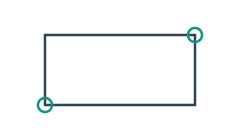
Names don't break; indices do
We already shipped vertex-targeted fillets: filletAtVertex(1, 12) rounds "the second corner." The problem is what happens next week, when you add a notch earlier in the path — every index shifts, and your fillet silently lands on the wrong corner. CAD systems call this the topological naming problem, and their answer is the same one we've adopted: name the geometry at definition, address it by name forever.
fn tab(withNotch) {
  return @{
    h 30
    if (withNotch) {
      v 8
      h 10
      v -8
    } else {
      h 10
    }
    h 40 as endpoint('spout')
    v 55
    h -80
    z
  };
}

let plain = tab(false).vertex('spout').fillet(12);
let notched = tab(true).vertex('spout').fillet(12);
define ViewBox(0, 0, 240, 130);
define default PathLayer('tabs') #{ stroke: #334155; stroke-width: 2.5; fill: none; }

// Index-based: filletAtVertex(1, 12) rounds "the second corner" — until an
// edit inserts a notch earlier in the path and every index shifts.
// Name-based: vertex('spout') keeps pointing at the same joint, before and
// after the notch exists.

fn tab(withNotch) {
  return @{
    h 30
    if (withNotch) {
      v 8
      h 10
      v -8
    } else {
      h 10
    }
    h 40 as endpoint('spout')
    v 55
    h -80
    z
  };
}

let plain = tab(false).vertex('spout').fillet(12);
plain.drawTo(25, 35);

let notched = tab(true).vertex('spout').fillet(12);
notched.drawTo(135, 35);

The notched variant has three extra commands before the corner. An index-based fillet would need updating; vertex('spout') doesn't care.
One name, many segments
Labels don't have to be unique. A name shared by several statements forms a group, and the query API splits into the pairing you already know from the DOM: segment('tooth') is querySelector — the first match — while segmentAll('tooth') is querySelectorAll, returning every match in authoring order. The same goes for pointAll and vertexAll.
That makes loop-generated geometry the easy case. Five teeth, one name, zero index bookkeeping:
M 35 105
for (i in 0..4) {
  v -55 as segment('tooth');
  v 55 as endpoint('root');
  h 35;
}

for (tooth in layer('comb').segmentAll('tooth')) {
  let tip = tooth.get(1);
  circle(tip.x, tip.y, 4);
}
define ViewBox(0, 0, 240, 140);
define default PathLayer('comb') #{ stroke: #334155; stroke-width: 2.5; fill: none; }
define PathLayer('tips') #{ fill: #db2777; }

// One name, five teeth. Labels don't have to be unique — a shared name
// forms a GROUP, so loops need no index bookkeeping at all.
M 35 105
for (i in 0..4) {
  v -55 as segment('tooth');
  v 55 as endpoint('root');
  h 35;
}

// querySelectorAll-style: segmentAll returns every match, in order.
layer('tips').apply {
  for (tooth in layer('comb').segmentAll('tooth')) {
    let tip = tooth.get(1);
    circle(tip.x, tip.y, 4);
  }
}
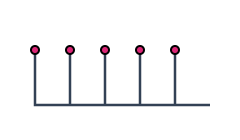
When members need distinct names, label names are expressions — as segment(`rib-${i}`) — so you can opt into individual addressing whenever the group reading isn't enough. And the All queries return an empty array (not an error) when nothing matches, so they're safe to loop over speculatively.
Layers answer questions now
The quiet structural win: layers built with apply { } used to be write-only. You could route commands into them, but a layer could never tell you anything about its own geometry. Labels change that — layer('name').segment(...), .point(...), and .vertex(...) read named geometry back out of any path layer:
define ViewBox(0, 0, 240, 140);
define PathLayer('road') #{ stroke: #334155; stroke-width: 3; fill: none; }
define PathLayer('ticks') #{ stroke: #f59e0b; stroke-width: 2; fill: none; }

// A layer built with apply {} used to be write-only: you could add to it,
// but never ask it anything. Labels make layers queryable.
layer('road').apply {
  M 20 110
  h 50;
  v -60 with fillet(28);
  h 140 as segment('straightaway');
}

// Read the named stretch back OUT of the road layer and cross-hatch it.
layer('ticks').apply {
  let run = layer('road').segment('straightaway');
  for (op in run.partition(10)) {
    let a = calc(op.angle + 1.5708);
    M calc(op.point.x - cos(a) * 5) calc(op.point.y - sin(a) * 5)
    l calc(cos(a) * 10) calc(sin(a) * 10)
  }
}
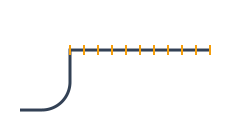
The ticks layer never hard-codes where the straightaway is. It asks the road layer, gets a ProjectedPath in absolute coordinates, and decorates along it. Reshape the road and the ticks follow.
Under the hood, and what's next
Making this work took more than syntax. Both evaluators now track every emitted fragment as a structured record — the byte-exact output string paired with its commands, labels, and recorded corner ops — instead of an append-only string list. Zero-annotation programs emit byte-identical output to the previous release (our render snapshots enforce this), while annotated programs get finalization, label-preserving trims, and the query APIs on top of the same store.
That structured store is the foundation for what's next: labels give the compiler stable handles into path interiors, which opens the door to editing named segments in place, per-segment styling, and richer inspector tooling. The docs page covers the full syntax, the error catalogue, and the querying rules — everything in it compiles verbatim against this release.
Every sample above opens in the playground with one click — change a radius, rename a label, add a command before a named corner and watch the queries follow. Or start from scratch in the playground.