Say It Once: switch and case Come to Pathogen
Prerequisites: the samples lean on enums,
letdestructuring, andlayer().applywithout introducing them. If those are new, the linked docs sections are short.
Every drawing program has a moment where one value decides several
things. A marker kind picks a shape. An angle picks a quadrant. A score
picks a label and a bar width. Until now, Pathogen spelled that moment as
an if / else if chain that names the value on every branch. Now it
has a switch:
switch(marker) {
  case "dot", "bullet" {
    circle(cx, cy, 6);
  }
  case "ring" {
    circle(cx, cy, 10);
    circle(cx, cy, 5);
  }
  default {
    rect(cx - 6, cy - 6, 12, 12);
  }
}
The value in parentheses is evaluated once. Cases are tried in order, the
first one that matches runs its body, and the switch ends. There is no
fallthrough, so there is no break to remember. That much will look
familiar from JavaScript. The rest of this post is about what a case can
be, because that is where Pathogen's version stops looking like
JavaScript's.
The chain it replaces
Here is the shape of code this feature exists for. Two rows of markers, and the marker kind is compared up to three times per marker:
define ViewBox(0, 0, 320, 150);

define default PathLayer('marks') #{
  fill: none;
  stroke: #c0518e;
  stroke-width: 2;
}

// Before: the same value compared on every branch. Two rows of markers,
// and `kind` is tested up to three times per marker.
let rows = [
  [
    'dot',
    'ring',
    'box',
    'spark',
    'ring',
  ],
  [
    'ring',
    'box',
    'dot',
    'dot',
    'spark',
  ],
];

for ([kinds, row] in rows) {
  let cy = 45 + row * 60;
  for ([kind, index] in kinds) {
    let cx = 40 + index * 60;
    if (kind == 'dot') {
      circle(cx, cy, 10);
    } else if (kind == 'ring') {
      circle(cx, cy, 16);
      circle(cx, cy, 8);
    } else if (kind == 'box') {
      rect(cx - 12, cy - 12, 24, 24);
    } else {
      star(cx,
          cy,
          16,
          7,
          5);
    }
  }
}
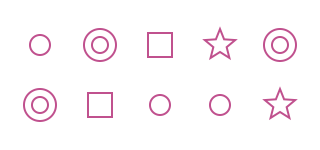
The same drawing with a switch. The value is named once and the enum members read as a list:
define ViewBox(0, 0, 320, 150);

define default PathLayer('marks') #{
  fill: none;
  stroke: #c0518e;
  stroke-width: 2;
}

// After: say the value once. Enum members and string literals both work,
// and Dot, Spark share one body. No fallthrough, so no break.
enum Marker {
  Dot,
  Ring,
  Box,
  Spark,
}

let rows = [
  [
    Marker.Dot,
    Marker.Ring,
    Marker.Box,
    Marker.Spark,
    Marker.Ring,
  ],
  [
    Marker.Ring,
    Marker.Box,
    Marker.Dot,
    Marker.Dot,
    Marker.Spark,
  ],
];

for ([kinds, row] in rows) {
  let cy = 45 + row * 60;
  for ([kind, index] in kinds) {
    let cx = 40 + index * 60;
    switch(kind) {
      case Marker.Dot {
        circle(cx, cy, 10);
      }
      case Marker.Ring {
        circle(cx, cy, 16);
        circle(cx, cy, 8);
      }
      case Marker.Box {
        rect(cx - 12, cy - 12, 24, 24);
      }
      default {
        star(cx,
            cy,
            16,
            7,
            5);
      }
    }
  }
}
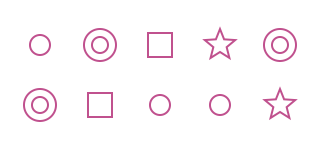
A case pattern can be any expression: a number, a string, an enum member,
a variable, or arithmetic like case cols - 1. The match uses the same
rules as ==, with one difference worth stating early: a value that ==
cannot compare, such as a Point against a number, is simply not a match.
It falls through to the next case or to default instead of raising an
error. Several patterns separated by commas share one body, and a
switch with no default simply does nothing when nothing matches; the
second switch in the next sample relies on exactly that.
Ranges, including angles
This is the case that a drawing language needs most, and the one that
comes from Ruby rather than JavaScript. A range pattern buckets a
continuous value. 0..10 matches 0 through 10 inclusive, the same
spelling for loops use. 0..<10 is half-open, which means it excludes
the upper bound, so two adjacent bands never both claim the number on
their shared boundary. Leave off a bound and the range is open-ended:
..<0 is everything below zero, 100.. is everything from 100 up.
Ranges work over angles too, using the same comparison as < and <=,
so a quadrant test is one line per quadrant:
define ViewBox(0, 0, 200, 200);

define default PathLayer('marks') #{
  fill: none;
  stroke: #c0518e;
  stroke-width: 2;
}

// Range patterns bucket a continuous value. Half-open ranges (..<) mean
// adjacent bands never both claim a boundary; open-ended ranges (..<6,
// 18..) catch everything below or above.
for (i in 0..<24) {
  let heading = i * 15deg;
  let len = 0;
  switch(heading) {
    case 0deg..<90deg {
      len = 70;
    }
    case 90deg..<180deg {
      len = 55;
    }
    case 180deg..<270deg {
      len = 40;
    }
    default {
      len = 25;
    }
  }
  M calc(100 + cos(heading) * 8) calc(100 + sin(heading) * 8)
  L calc(100 + cos(heading) * len) calc(100 + sin(heading) * len)

  let dotRadius = 0;
  switch(i) {
    case ..<6 {
      dotRadius = 5;
    }
    case 6..11 {
      dotRadius = 4;
    }
    case 12..<18 {
      dotRadius = 3;
    }
    case 18.. {
      dotRadius = 2;
    }
  }
  circle(100 + cos(heading) * (len + 8), 100 + sin(heading) * (len + 8), dotRadius);
}
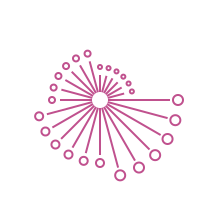
One rule to know: a range pattern always reads low to high. case 5..<0
matches nothing, while the same range in a for loop counts down. And
the half-open spelling is now accepted by for loops as well, so
for (i in 0..<points.length) visits every index exactly once without
the off-by-one arithmetic.
Shapes, bindings, and guards
The pattern that comes from Swift. A destructuring pattern tests a
value's shape and binds its parts for the body. case {x, y} matches any
object or struct with those properties, a Point included, and makes x
and y available inside the case. case [first, second] matches an
array of exactly that length; add ...rest to accept longer ones.
A where guard narrows a match after the bindings exist. When the guard
is false the whole case is skipped and matching moves on, which is how
the second {x, y} case below catches everything the first one turned
down:
define ViewBox(0, 0, 200, 200);

define default PathLayer('marks') #{
  fill: none;
  stroke: #c0518e;
  stroke-width: 2;
}

// Destructuring patterns test a value's shape and bind its parts. A
// where guard narrows a match after the bindings exist. Points above
// the diagonal get a ring, points on or below it a box; arrays
// dispatch on their length.
let targets = [
  Point(150, 40),
  Point(40, 150),
  Point(120, 120),
  [
    100,
    160,
    50,
  ],
  [
    170,
    170,
  ],
];

for (item in targets) {
  switch(item) {
    case { x, y } where x > y {
      circle(x, y, 9);
      circle(x, y, 4);
    }
    case { x, y } {
      rect(x - 7, y - 7, 14, 14);
    }
    case [cx, cy, size] {
      star(cx,
          cy,
          size / 2,
          size / 5,
          5);
    }
    case [cx, cy] {
      circle(cx, cy, 6);
    }
  }
}

M 15 15
L 185 185
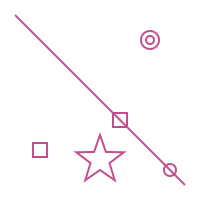
Bindings live only inside their case body. A bare name in a pattern is
always the variable's current value, never a new binding, so
case limit compares against limit rather than capturing it. And
because array and object literals in a pattern are read as shapes,
case [1, 2] is a compile error rather than a value to compare against;
to match on contents, bind them and test in a guard.
A switch that is a value
Pathogen is an expression-first language, and a switch that could only
run statements would leave the most common use on the table: picking a
number. So a switch can also produce a value. Put one expression inside
each pair of braces, end with default, and use the whole thing wherever
an expression goes:
let radius = switch(level) {
  case 1, 2 { 4 }
  case 3..<7 { 8 }
  default { 12 }
};
Only the chosen arm's expression runs, and a semicolon after it is fine
(case 1, 2 { 4; } is the same arm). default is required because the
expression must always produce something. It works on the right of
let, in function arguments, inside a backtick template's ${ }, and
inside calc(), which is also how it goes into a path command's
arguments:
define ViewBox(0, 0, 320, 110);

define default PathLayer('marks') #{
  fill: none;
  stroke: #c0518e;
  stroke-width: 2;
}

// The expression form: one expression per arm, default required. The
// size and the lift are switch expressions that drop straight into a
// let; the underline's right end is one inside a path argument.
enum Marker {
  Dot,
  Ring,
  Box,
  Spark,
}

let kinds = [
  Marker.Dot,
  Marker.Ring,
  Marker.Box,
  Marker.Spark,
  Marker.Ring,
];

for ([kind, index] in kinds) {
  let cx = 40 + index * 60;
  let size = switch(kind) {
    case Marker.Dot { 10 }
    case Marker.Ring { 16 }
    default { 12 }
  };
  let lift = switch(index) {
    case 0..<2 { 0 }
    case 2..<4 { -12 }
    default { 12 }
  };
  let cy = 52 + lift;
  switch(kind) {
    case Marker.Dot {
      circle(cx, cy, size);
    }
    case Marker.Ring {
      circle(cx, cy, size);
      circle(cx, cy, size - 8);
    }
    case Marker.Box {
      rect(cx - size, cy - size, size * 2, size * 2);
    }
    default {
      star(cx,
          cy,
          size + 4,
          size / 2,
          5);
    }
  }
  M calc(cx - size) calc(78 + lift)
  L calc(cx + switch(kind) {
    case Marker.Box { size * 2 }
    default { size }
  }) calc(78 + lift)
}

Inside text
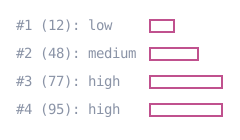
A switch works inside text(x, y) { } bodies too, where the case bodies
hold text items instead of path commands. That lets a label and the
geometry beside it come from the same value with the same ranges:
define ViewBox(0, 0, 240, 140);

define default PathLayer('marks') #{
  fill: none;
  stroke: #c0518e;
  stroke-width: 2;
}

// Inside a text body the case bodies hold text, so a label and its bar
// come from the same score with the same ranges.
define TextLayer('labels') #{
  font-size: 14;
  font-family: monospace;
  fill: #8a93a6;
}

let scores = [
  12,
  48,
  77,
  95,
];

for ([score, row] in scores) {
  let y = 30 + row * 28;
  layer('labels').apply {
    text(16, y) {
      `#${row + 1} (${score}): `
      switch(score) {
        case ..<40 {
          tspan()`low`;
        }
        case 40..<75 {
          tspan()`medium`;
        }
        default {
          tspan()`high`;
        }
      }
    }
  }
  let width = switch(score) {
    case ..<40 { 24 }
    case 40..<75 { 48 }
    default { 72 }
  };
  rect(150, y - 10, width, 12);
}
The fine print
The sharp edges, stated plainly:
- A
break;inside a case is not harmless. There is no fallthrough to stop, andbreakalways means the enclosing loop. Inside a loop it exits that loop; outside one it fails to compile.continuebehaves the same way. This is the JavaScript habit most worth unlearning. switch,case, andwhereare reserved words and can no longer be used as variable names. No published sample used them, but a private file might.- A range never matches a non-numeric value. A string or a Point
against
case 0..10is a non-match, not an error. Booleans count as numeric. The bounds themselves must be numeric, and a non-numeric bound is a runtime error. - A guard runs once per case, not once per pattern. With comma
alternatives,
whereis checked against the bindings of the first pattern that matched, and a false result does not send the switch back to try the rest. Every alternative in such a case must bind the same names, or the program fails to parse. - Two places cannot hold a switch expression directly. A style value's
${ }allows one level of braces, and a bare path argument outsidecalc()accepts only simple values. In both, compute the value withletfirst. - A statement-position
switchis always the statement form. Add a trailing;and the parser reads it as a switch expression instead, which meansdefaultbecomes mandatory and each arm may hold only one expression, so a body of path commands stops parsing.
When to reach for it
Reach for switch when one value decides the branch. If your else if
chain compares the same thing on every line, that is the signal. If the
branches compare different things, keep the chain. And if the decision
is a number or a string rather than a set of statements, use the
expression form and let the value land where it is needed.
The full reference is in the Switch Statements docs, the expression form under Switch Expressions, and the loop side of the new range spelling under Half-Open Ranges. Every sample on this page is live: open the code pane, change a kind or a score, and watch the right case take over.
The value was always the thing being decided. Now the code says so once.