Stencils: Bridges Are Just Gaps
Part 4 of 5 in Broken Lines — projects that treat the stroke not as paint, but as geometry you can hold.
Series: Broken Lines
- Stroke geometry — dashes, outlines, and start points as real paths
- Sashiko — running stitches from binary sequences
- Leathercraft — stitch holes that can't disagree
- Stencils (this post) — bridges are just gaps
- What Broken Lines taught the language — the friction log, resolved
Prerequisites: Part 1's
dash()andoutline(), and the boolean operations — every aperture here is adifference(). The seam-merge behavior usesdash-seamfrom the stroke-geometry docs.
What it does
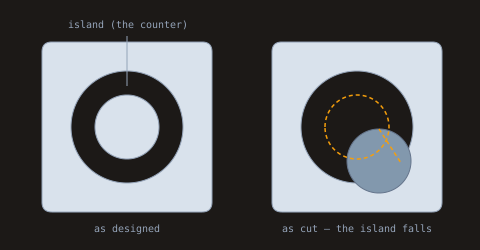
A stencil is a sheet with shapes cut out — and one hard constraint: every piece of the sheet must stay connected. Cut a ring and the circle in the middle — stencil makers call it an island, typographers call it a counter — is attached to nothing. It falls out on the workbench, and your "O" sprays as a dot. The fix, as old as stenciling: bridges, small tabs of sheet left uncut across the ring.
Today bridge placement is a manual chore — draw the shape, hand-draw tabs across it, cut, discover the counter on the floor, iterate. But look at what a bridged ring actually is: a centerline, cut most of the way around, with a few deliberate interruptions. Cut segments and interruptions. Dashes and gaps. The whole problem is a dash array.
Why you'd use it
Because the recipe is three steps and it parameterizes everything a stencil maker argues about — band width, bridge width, bridge count, and (through the dash offset) where the bridges land — while guaranteeing the geometry stays cuttable:
let cutLength = calc(centerline.length / bridgeCount - bridgeWidth);
let pieces = centerline.dash(#{
  stroke-dasharray: ${cutLength} ${bridgeWidth};
  dash-seam: merge;
});
for (segment in pieces.filter {|piece| piece.kind == 'dash'}) {
  stencil = stencil.difference(segment.path.outline(#{
    stroke-width: ${bandWidth};
  }));
}
Dash the centerline, outline() each dash to the band width,
difference() each one from the sheet. The gaps were never cut — they
are the bridges. Everything below is cut from mylar — the tough
polyester film most stencils are cut from — but the sheet material
never enters the math.
Example 1 — The island problem
The failure mode first, per house rules. Left: the design — a clean ring, counter in place. Right: the same cut on the bench — the counter is attached to nothing, and gravity is undefeated.
//-- The stencil problem in one picture: cut a ring and the middle is
//-- an island — connected to nothing. Left: the design. Right: what
//-- gravity does to it.

define ViewBox(0, 0, 480, 250);

let table = PathLayer('table') #{
  fill: #1c1917;
  stroke: none;
};
layer('table').apply {
  rect(0, 0, 480, 250);
}

let scene = GroupLayer('scene') #{};
let mylar = PathLayer('mylar') #{
  fill: #d9e2ec;
  stroke: #94a3b8;
  stroke-width: 1;
};
let fallen = PathLayer('fallen') #{
  fill: #8298ad;
  stroke: #64748b;
  stroke-width: 1;
};
let driftMarks = PathLayer('drift-marks') #{
  stroke: #f59e0b;
  stroke-width: 1.5;
  stroke-dasharray: 4 3;
  fill: none;
};
let leaders = PathLayer('leaders') #{
  stroke: #94a3b8;
  stroke-width: 1;
  fill: none;
};
let labels = TextLayer('labels') #{
  font-family: monospace;
  font-size: 10;
  fill: #94a3b8;
  text-anchor: middle;
};
scene.append(mylar,
    fallen,
    driftMarks,
    leaders,
    labels);

let sheet = @{
  roundRect(0,
      0,
      170,
      170,
      10);
};
let ringOuter = @{
  circle(85, 85, 56);
};
let ringInner = @{
  circle(85, 85, 32);
};
// The cut sheet is the same in both panels: the outer circle removed.
// What differs is only where the counter — a separate piece of mylar,
// attached to nothing — ends up.
let holed = sheet.difference(ringOuter);

// Left: as designed — the counter sits in place (for now).
mylar.apply {
  M 42 42 holed.draw()
}
mylar.apply {
  M 42 42 ringInner.draw()
}

// Right: gravity. The dashed ring marks where the island used to sit;
// the short line traces its fall.
mylar.apply {
  M 272 42 holed.draw()
}
fallen.apply {
  M 294 76 ringInner.draw()
}
driftMarks.apply {
  M 272 42 ringInner.draw()
  M 379 129
  l 22 34
}

leaders.apply {
  M 127 36
  v 50
}
labels.apply {
  text(127, 28)`island (the counter)`;
  text(127, 232)`as designed`;
  text(357, 232)`as cut — the island falls`;
}
Example 2 — Dash the centerline first
Before anything is cut, dash the ring's centerline and just look at
the pieces — part 1's vocabulary, on a loop. The dark arcs are what
the blade will follow; the short green arcs are the bridges, and they
exist as geometry before any cutting happens. Bridge placement is the
dash offset: stroke-dashoffset shifts the pattern within the
path (part 1's startAt() moved the path's start instead — same
effect, different knob), and here a half-segment shift parks the four
bridges on the diagonals instead of the cardinals.
//-- Before anything is cut: dash the ring's centerline and LOOK at the
//-- pieces. The dashes are what the blade will follow; the gaps are the
//-- bridges — decided here, as lengths, before any geometry moves.

define ViewBox(0, 0, 480, 256);

let table = PathLayer('table') #{
  fill: #1c1917;
  stroke: none;
};
table.apply {
  rect(0, 0, 480, 256);
}

let scene = GroupLayer('scene') #{};
let sheetLayer = PathLayer('sheet') #{
  fill: #d9e2ec;
  stroke: #94a3b8;
  stroke-width: 1;
};
let cutMarks = PathLayer('cut-marks') #{
  stroke: #334155;
  stroke-width: 4;
  stroke-linecap: butt;
  fill: none;
};
let bridgeMarks = PathLayer('bridge-marks') #{
  stroke: #22c55e;
  stroke-width: 6;
  stroke-linecap: butt;
  fill: none;
};
let labels = TextLayer('labels') #{
  font-family: monospace;
  font-size: 10;
  fill: #94a3b8;
  text-anchor: middle;
};
scene.append(sheetLayer, cutMarks, bridgeMarks, labels);

let sheet = @{
  roundRect(0,
      0,
      190,
      190,
      10);
};
sheetLayer.apply {
  M 145 26 sheet.draw()
}

let centerline = @{
  circle(95, 95, 48);
};
let bridgeWidth = 13;
let bridgeCount = 4;
let cutLength = calc(centerline.length / bridgeCount - bridgeWidth);

// Shift back half a segment so the bridges land on the diagonals.
let pieces = centerline.dash(#{
  stroke-dasharray: ${cutLength} ${bridgeWidth};
  stroke-dashoffset: calc(0 - cutLength / 2);
  dash-seam: merge;
});

for (piece in pieces) {
  if (piece.kind == 'dash') {
    cutMarks.apply {
      M 145 26 piece.path.draw()
    }
  } else {
    bridgeMarks.apply {
      M 145 26 piece.path.draw()
    }
  }
}

labels.apply {
  text(240, 238)`dark: to be cut — green: the bridges, never cut at all`;
}
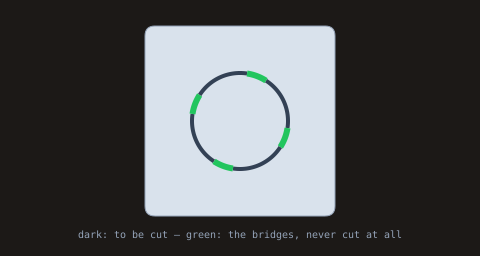
That shift has one consequence worth understanding. A closed path has
a seam — the point where it starts and ends, and where the dash
pattern begins. Shift the pattern half a segment and the seam lands
mid-cut, which would hand back two half-segments; dash-seam: merge
stitches them back into one, so the counts below stay honest.
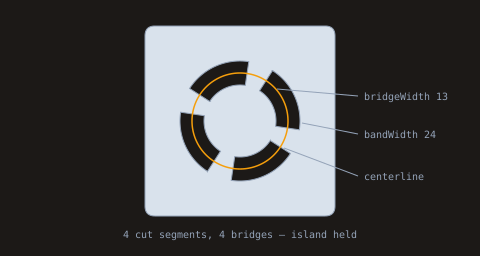
Example 2b — Outline and subtract
Now the cut. Each dash is outlined to the band width with butt caps
— flat bridge shoulders, the way a blade would leave them — and
subtracted from the sheet. The leader lines mark the three parameters.
//-- The fix: don't cut the whole ring. Dash its centerline — the
//-- dashes become cut segments, the gaps become bridges — and the
//-- island is held. dash-seam: merge keeps the wrap-around segment
//-- whole, so the counts are honest.

define ViewBox(0, 0, 480, 256);

let table = PathLayer('table') #{
  fill: #1c1917;
  stroke: none;
};
layer('table').apply {
  rect(0, 0, 480, 256);
}

let scene = GroupLayer('scene') #{};
let mylar = PathLayer('mylar') #{
  fill: #d9e2ec;
  stroke: #94a3b8;
  stroke-width: 1;
};
let centerlineGhost = PathLayer('centerline-ghost') #{
  stroke: #f59e0b;
  stroke-width: 1.5;
  fill: none;
};
let leaders = PathLayer('leaders') #{
  stroke: #94a3b8;
  stroke-width: 1;
  fill: none;
};
let labels = TextLayer('labels') #{
  font-family: monospace;
  font-size: 10;
  fill: #94a3b8;
  text-anchor: middle;
};
scene.append(mylar, centerlineGhost, leaders, labels);

let sheet = @{
  roundRect(0,
      0,
      190,
      190,
      10);
};

// The ring to cut, described by its CENTERLINE and a band width.
let centerline = @{
  circle(95, 95, 48);
};
let bandWidth = 24;
let bridgeWidth = 13;
let bridgeCount = 4;

// Shift back half a segment so the bridges land on the diagonals, off
// the cardinals. That drops the path's own seam mid-cut — dash-seam:
// merge stitches the two halves back into one honest segment.
let cutLength = calc(centerline.length / bridgeCount - bridgeWidth);
let pieces = centerline.dash(#{
  stroke-dasharray: ${cutLength} ${bridgeWidth};
  stroke-dashoffset: calc(0 - cutLength / 2);
  dash-seam: merge;
});
let cutSegments = pieces.filter() {|piece| piece.kind == 'dash'};

let stencil = sheet;
for (segment in cutSegments) {
  let aperture = segment.path.outline(#{
    stroke-width: ${bandWidth};
    stroke-linecap: butt;
  });
  stencil = stencil.difference(aperture);
}

mylar.apply {
  M 145 26 stencil.draw()
}
centerlineGhost.apply {
  M 145 26 centerline.draw()
}

// Leader-line annotations in the side canvas: the three parameters a
// stencil maker argues about, pointed at the geometry they control.
leaders.apply {
  M 358 96
  l -81 -7
  M 358 134
  l -56 -11
  M 358 176
  l -74 -28
}
labels.apply {
  text(240, 238)`${cutSegments.length} cut segments, ${pieces.length - cutSegments.length} bridges — island held`;
}
let sideLabels = TextLayer('side-labels') #{
  font-family: monospace;
  font-size: 10;
  fill: #94a3b8;
};
scene.append(sideLabels);
sideLabels.apply {
  text(364, 100)`bridgeWidth 13`;
  text(364, 138)`bandWidth 24`;
  text(364, 180)`centerline`;
}
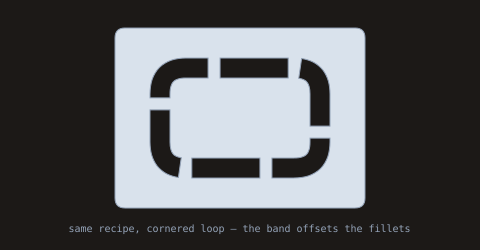
Example 3 — Any loop will do
Nothing in the recipe mentions a circle. A rounded-rectangle band gets
the same treatment — and its rounded band corners come from a nice
piece of geometry: the centerline's fillets are already curves, so
outline() simply offsets them, concentrically — inner radius 16,
outer 36 around a radius-26 fillet. (The stroke-linejoin in the
sample is honest-to-goodness inert here: a tangent-continuous
centerline has no corner for a join to act on. It would matter on a
sharp-cornered rect() centerline.) The bridges land wherever the
offset puts them — drive the offset to move them. Swap the
centerline, keep the recipe.
//-- The mechanic doesn't care about the shape. A rounded-square band:
//-- dash the centerline, outline each cut with the band width — the
//-- round joins follow the corners — and place bridges where the
//-- pattern says.

define ViewBox(0, 0, 480, 250);

let table = PathLayer('table') #{
  fill: #1c1917;
  stroke: none;
};
layer('table').apply {
  rect(0, 0, 480, 250);
}

let scene = GroupLayer('scene') #{};
let mylar = PathLayer('mylar') #{
  fill: #d9e2ec;
  stroke: #94a3b8;
  stroke-width: 1;
};
let labels = TextLayer('labels') #{
  font-family: monospace;
  font-size: 10;
  fill: #94a3b8;
  text-anchor: middle;
};
scene.append(mylar, labels);

let sheet = @{
  roundRect(0,
      0,
      250,
      180,
      10);
};
let centerline = @{
  roundRect(45,
      40,
      160,
      100,
      26);
};
let bandWidth = 20;
let bridgeWidth = 12;
let bridgeCount = 6;

let cutLength = calc(centerline.length / bridgeCount - bridgeWidth);
// Shift back half a segment: bridges off the corners.
let pieces = centerline.dash(#{
  stroke-dasharray: ${cutLength} ${bridgeWidth};
  stroke-dashoffset: calc(0 - cutLength / 2);
  dash-seam: merge;
});

let cutSegments = pieces.filter() {|piece| piece.kind == 'dash'};
let stencil = sheet;
for (segment in cutSegments) {
  // stroke-linejoin is inert here: the roundRect centerline is already
  // tangent-continuous, so there is no corner for a join to act on —
  // the band's rounded corners are concentric OFFSETS of the fillets.
  let aperture = segment.path.outline(#{
    stroke-width: ${bandWidth};
    stroke-linecap: butt;
    stroke-linejoin: round;
  });
  stencil = stencil.difference(aperture);
}

mylar.apply {
  M 115 28 stencil.draw()
}

labels.apply {
  text(240, 232)`same recipe, cornered loop — the band offsets the fillets`;
}
Two practical floors before you scale this: cutLength goes negative
— a compile error, since negative dash entries are rejected — as soon
as bridgeWidth × bridgeCount reaches the centerline's length, so a
small ring caps how many bridges it can carry. And these are user
units; real bridges have a material minimum width (too narrow tears
during cutting or lifts under spray), which no geometry can supply.
Example 4 — The trail marker
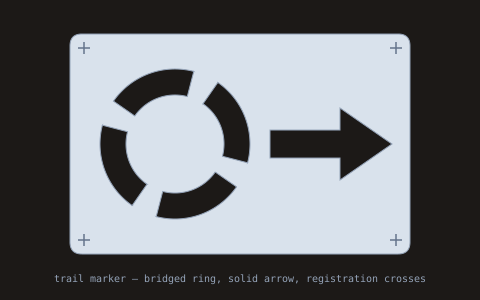
The finished artifact: a spray-ready sheet. The bridged ring from Example 2, a solid arrow aperture (no island — no bridge needed), and corner registration crosses derived from the sheet's dimensions. This is the file you'd hand a laser — with one practitioner detail already encoded: the crosses live on their own layer, because a cutter has to be told which lines are cuts and which are reference. Send the sheet layer to the blade; the registration layer is for aligning pass two.
//-- The finished artifact: a spray-ready trail-marker stencil. Bridged
//-- ring, solid arrow aperture, corner registration marks — one sheet.

define ViewBox(0, 0, 480, 300);

let table = PathLayer('table') #{
  fill: #1c1917;
  stroke: none;
};
layer('table').apply {
  rect(0, 0, 480, 300);
}

let scene = GroupLayer('scene') #{};
let mylar = PathLayer('mylar') #{
  fill: #d9e2ec;
  stroke: #94a3b8;
  stroke-width: 1;
};
let registration = PathLayer('registration') #{
  stroke: #64748b;
  stroke-width: 1.5;
  fill: none;
};
let labels = TextLayer('labels') #{
  font-family: monospace;
  font-size: 10;
  fill: #94a3b8;
  text-anchor: middle;
};
scene.append(mylar, registration, labels);

let sheet = @{
  roundRect(0,
      0,
      340,
      220,
      12);
};

// Bridged ring, as before.
let ringCenter = @{
  circle(105, 110, 62);
};
let bandWidth = 26;
let bridgeWidth = 14;
let cutLength = calc(ringCenter.length / 4 - bridgeWidth);
// Shift back half a segment: bridges off the cardinals.
let ringPieces = ringCenter.dash(#{
  stroke-dasharray: ${cutLength} ${bridgeWidth};
  stroke-dashoffset: calc(0 - cutLength / 2);
  dash-seam: merge;
});

// Solid arrow aperture — no island, no bridge needed.
let arrow = @{
  m 200 96
  h 70
  v -22
  l 52 36
  l -52 36
  v -22
  h -70
  z
};

let cutSegments = ringPieces.filter() {|piece| piece.kind == 'dash'};
let stencil = sheet.difference(arrow);
for (segment in cutSegments) {
  let aperture = segment.path.outline(#{
    stroke-width: ${bandWidth};
    stroke-linecap: butt;
  });
  stencil = stencil.difference(aperture);
}

mylar.apply {
  M 70 34 stencil.draw()
}

// Corner registration marks on their own layer — a cutter needs to be
// told which lines are cuts and which are reference, and the layer is
// how you tell it. Placed from the sheet's own dimensions.
let sheetW = 340;
let sheetH = 220;
let sheetX = 70;
let sheetY = 34;
let markInset = 14;
fn crosshair(centerX, centerY) {
  registration.apply {
    M calc(centerX - 6) centerY
    h 12
    M centerX calc(centerY - 6)
    v 12
  }
}
crosshair(calc(sheetX + markInset), calc(sheetY + markInset));
crosshair(calc(sheetX + sheetW - markInset), calc(sheetY + markInset));
crosshair(calc(sheetX + markInset), calc(sheetY + sheetH - markInset));
crosshair(calc(sheetX + sheetW - markInset), calc(sheetY + sheetH - markInset));

labels.apply {
  text(240, 282)`trail marker — bridged ring, solid arrow, registration crosses`;
}
Where to go next
Three crafts, one toolkit — the full surface is in the stroke geometry reference, and the stitching posts this one leans against are sashiko and leathercraft. And there's a stack of notes about everywhere the language pushed back while these posts were being written: the closing post opens the friction log — what hurt, what got fixed, and what the fixes look like.