Stroke Geometry: Dashes, Outlines, and Start Points as Real Paths
Part 1 of 5 in Broken Lines — projects that treat the stroke not as paint, but as geometry you can hold.
Series: Broken Lines
- Stroke geometry (this post) — dashes, outlines, and start points as real paths
- Sashiko — running stitches from binary sequences
- Leathercraft — stitch holes that can't disagree
- Stencils — bridges are just gaps
- What Broken Lines taught the language — the friction log, resolved
Prerequisites: This series builds on PathBlocks — reusable path values you draw at a position — and touches the boolean operations (
union,difference) in a few places. Skim those first if either is new.
What it does
When a renderer draws a dashed stroke, the dashes exist only as paint: you can see them, but you can't ask for them. Three PathBlock methods turn that paint back into geometry.
dash(styles)
partitions a path using the same properties CSS uses, and hands back
every piece — the inked dashes and the spaces between them — as real
paths:
let pieces = wave.dash(#{
  stroke-dasharray: 26 14;
});
// [{ path, kind: 'dash' | 'gap', t0, t1 }, ...]
outline(styles) converts
a stroked line into the closed path that outlines it — the same
operation as "Outline Stroke" in Illustrator or "Stroke to Path" in
Inkscape. Closed means fillable, and fillable means it works in boolean
operations.
startAt(t)
re-anchors a path to begin at any fraction of its length — and since a
dash pattern starts wherever its path does, moving the start moves
every dash. On a closed path that's a seamless rotation; on an open
path the ends can't be rejoined, so the result is two runs — t to
the end, then a jump back for the remainder.
Four things to know before the pictures, because everything below leans on them:
- Pieces keep their place. Every piece from
dash()— and every outline — remembers exactly where it sat in the source path. Draw them all at one position and they reassemble the original. There is no coordinate bookkeeping in any example on this page. - The methods compose.
dash()gives centerline pieces — the bare line a stroke would be painted along, with no width of its own, which is whydash()rejectsstroke-widthoutright.outline()is what gives a piece width, end caps, and corner treatment — per piece, which is the one thing a renderer's stroke can never do. - Caps extend the geometry. With
roundorsquarecaps,outline()extends a piece by half the stroke width at each end (buttadds nothing). Outlined dash pieces stay separate shapes only while the gap is wider than the stroke — narrower than that, and neighboring pieces fuse. - Style values are live expressions.
stroke-width: calc(3 + piece.t0 * 16)computes per piece. The flip side: a space-separated pair that reads as arithmetic (stroke-dasharray: 10 -5) is evaluated as math beforedash()sees it — use commas in any list whose tokens could parse that way.
One more thing this series is: a working friction log, in the Cutting Room tradition. These posts were built against the real language, and every place the work exposed a gap, a bug, or a rough edge went into a log. Some of those entries became fixes that shipped before the series ended; the rest are on the bench with their diagnoses attached — part 5 tells that story.
Why you'd use it
Because a surprising number of real crafts are made of interrupted lines. A sashiko pattern is running stitches — dashes. Leather seams are rows of punched holes — very short dashes, outlined round. A stencil survives because of its bridges — which are gaps, placed on purpose. Each of those needs the pieces as objects — to place, to thicken, to punch, to cut — not as paint. That's the series. This post is the toolkit.
Example 1 — The first partition
One wave, one dash array. The pieces come back alternating in path order — dashes drawn solid here, gaps ghosted thin, both from the same loop over the same array.
//-- One wave, one dasharray. dash() hands the pattern back as real
//-- geometry: every piece is a path — dashes drawn solid, gaps ghosted.

define ViewBox(0, 0, 480, 220);

let bg = PathLayer('bg') #{
  fill: #0f172a;
  stroke: none;
};
layer('bg').apply {
  rect(0, 0, 480, 220);
}

let scene = GroupLayer('scene') #{};
let gaps = PathLayer('gaps') #{
  stroke: #94a3b840;
  stroke-width: 1.5;
  fill: none;
};
let dashes = PathLayer('dashes') #{
  stroke: #38bdf8;
  stroke-width: 4;
  stroke-linecap: round;
  fill: none;
};
let labels = TextLayer('labels') #{
  font-family: monospace;
  font-size: 10;
  fill: #94a3b8;
};
scene.append(gaps, dashes, labels);

let wave = @{
  c 40 -70 80 -70 120 0
  c 40 70 80 70 120 0
  c 40 -70 80 -70 120 0
};

let pieces = wave.dash(#{
  stroke-dasharray: 26 14;
});

for (piece in pieces) {
  if (piece.kind == 'dash') {
    dashes.apply {
      M 60 120 piece.path.draw()
    }
  } else {
    gaps.apply {
      M 60 120 piece.path.draw()
    }
  }
}

labels.apply {
  text(60, 36)`dashes drawn solid, gaps ghosted — same wave, ${pieces.length} pieces`;
}
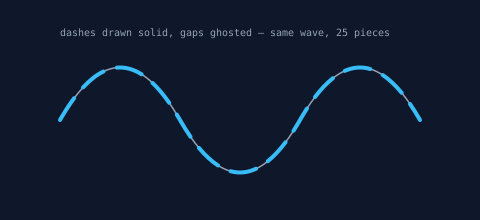
Every piece is a PathBlock. Anything a path can do — sample it, bound it, transform it — a dash can do.
Example 2 — Position rides with the piece
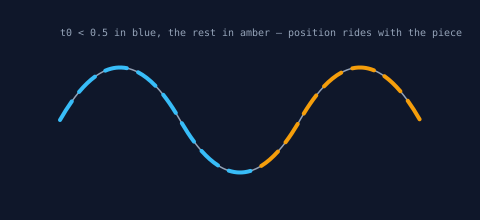
Each piece carries t0 and t1, its start and end as fractions of
the path's length. Filtering on them needs no geometry at all: here
the first half of the wave goes blue, the rest amber.
//-- Every piece carries its position: t0 and t1 are arc-length fractions.
//-- Here the first half of the wave's dashes go blue, the second half
//-- amber — a filter on t0, no coordinate math.

define ViewBox(0, 0, 480, 220);

let bg = PathLayer('bg') #{
  fill: #0f172a;
  stroke: none;
};
layer('bg').apply {
  rect(0, 0, 480, 220);
}

let scene = GroupLayer('scene') #{};
let gaps = PathLayer('gaps') #{
  stroke: #94a3b840;
  stroke-width: 1.5;
  fill: none;
};
let earlyDashes = PathLayer('early-dashes') #{
  stroke: #38bdf8;
  stroke-width: 4;
  stroke-linecap: round;
  fill: none;
};
let lateDashes = PathLayer('late-dashes') #{
  stroke: #f59e0b;
  stroke-width: 4;
  stroke-linecap: round;
  fill: none;
};
let labels = TextLayer('labels') #{
  font-family: monospace;
  font-size: 10;
  fill: #94a3b8;
};
scene.append(gaps, earlyDashes, lateDashes, labels);

let wave = @{
  c 40 -70 80 -70 120 0
  c 40 70 80 70 120 0
  c 40 -70 80 -70 120 0
};

let pieces = wave.dash(#{
  stroke-dasharray: 22 12;
});

for (piece in pieces) {
  if (piece.kind == 'gap') {
    gaps.apply {
      M 60 120 piece.path.draw()
    }
  } else {
    if (piece.t0 < 0.5) {
      earlyDashes.apply {
        M 60 120 piece.path.draw()
      }
    } else {
      lateDashes.apply {
        M 60 120 piece.path.draw()
      }
    }
  }
}

labels.apply {
  text(60, 36)`t0 < 0.5 in blue, the rest in amber — position rides with the piece`;
}
Example 3 — outline() makes strokes into shapes
The same curve outlined three times at width 22, with the three CSS
cap styles. The thin dark line is the original centerline: the outline
straddles it exactly, because outlines keep their place too. The
dashed rule marks where the centerline ends — butt stops flush on
it; round and square reach half the stroke width past it. That
extension is the cap rule from the list above, drawn to scale.
//-- outline() turns a stroked line into the CLOSED path of the stroked
//-- region — Illustrator's "Outline Stroke" as a language method. Same
//-- curve three times: butt, round, square caps; centerline ghosted.

define ViewBox(0, 0, 480, 190);

let bg = PathLayer('bg') #{
  fill: #0f172a;
  stroke: none;
};
layer('bg').apply {
  rect(0, 0, 480, 190);
}

let scene = GroupLayer('scene') #{};
let solids = PathLayer('solids') #{
  fill: #f59e0b;
  stroke: none;
};
let spines = PathLayer('spines') #{
  stroke: #0f172a;
  stroke-width: 1;
  fill: none;
};
let capRule = PathLayer('cap-rule') #{
  stroke: #94a3b880;
  stroke-width: 1;
  stroke-dasharray: 4 3;
  fill: none;
};
let labels = TextLayer('labels') #{
  font-family: monospace;
  font-size: 10;
  fill: #94a3b8;
  text-anchor: middle;
};
scene.append(solids, spines, capRule, labels);

let stem = @{
  c 0 -70 90 -70 90 0
};

let capNames = [
  'butt',
  'round',
  'square',
];
let anchors = [
  65,
  200,
  335,
];

for ([capName, columnIndex] in capNames) {
  let anchorX = anchors[columnIndex];
  let solid = stem.outline(#{
    stroke-width: 22;
    stroke-linecap: ${capName};
  });
  solids.apply {
    M anchorX 125 solid.draw()
  }
  spines.apply {
    M anchorX 125 stem.draw()
  }
  labels.apply {
    text(calc(anchorX + 45), 165)`${capName}`;
  }
}

// Where the butt caps stop: round and square reach past this line by
// half the stroke width.
capRule.apply {
  M 50 125
  h 380
}
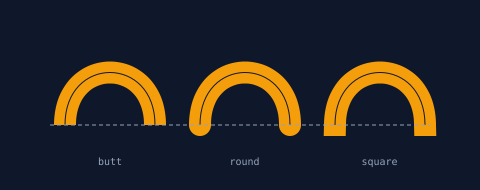
These are closed, filled paths — not strokes. The amber is fill.
Example 4 — Compose: a width per piece
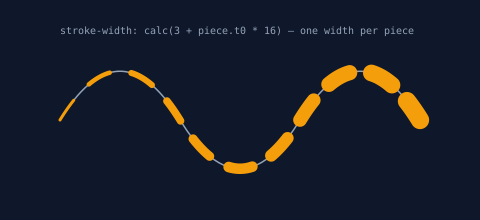
Partition first, then thicken each dash with its own outline() call.
The width is an expression over the piece's own t0, so the dashes
swell along the wave. A renderer's stroke-width applies to the whole
path; this applies per piece, because each piece is its own path.
//-- The methods compose: partition with dash(), thicken each piece with
//-- its own outline() — the width rides the piece's t0, so the dashes
//-- swell along the wave. No renderer can style a stroke this way.

define ViewBox(0, 0, 480, 220);

let bg = PathLayer('bg') #{
  fill: #0f172a;
  stroke: none;
};
layer('bg').apply {
  rect(0, 0, 480, 220);
}

let scene = GroupLayer('scene') #{};
let gaps = PathLayer('gaps') #{
  stroke: #94a3b840;
  stroke-width: 1.5;
  fill: none;
};
let swellingDashes = PathLayer('swelling-dashes') #{
  fill: #f59e0b;
  stroke: none;
};
let labels = TextLayer('labels') #{
  font-family: monospace;
  font-size: 10;
  fill: #94a3b8;
};
scene.append(gaps, swellingDashes, labels);

let wave = @{
  c 40 -65 80 -65 120 0
  c 40 65 80 65 120 0
  c 40 -65 80 -65 120 0
};

let pieces = wave.dash(#{
  stroke-dasharray: 24 22;
});

for (piece in pieces) {
  if (piece.kind == 'gap') {
    gaps.apply {
      M 60 120 piece.path.draw()
    }
  } else {
    let swollen = piece.path.outline(#{
      stroke-width: calc(3 + piece.t0 * 16);
      stroke-linecap: round;
      stroke-linejoin: round;
    });
    swellingDashes.apply {
      M 60 120 swollen.draw()
    }
  }
}

labels.apply {
  text(60, 34)`stroke-width: calc(3 + piece.t0 * 16) — one width per piece`;
}
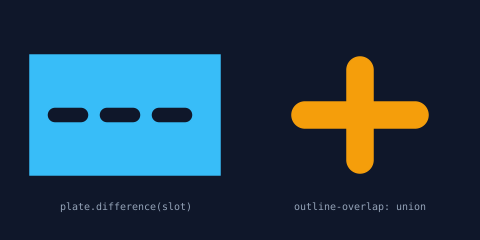
Example 5 — Closed means boolean-ready
Because outlines are closed, they participate in boolean operations
directly. Left: each fat dash subtracted from a plate —
plate.difference(slot) — leaving three discrete pill-shaped slots
(the gap is wider than the stroke; the cap rule again). Right: two
crossing strokes outlined with outline-overlap: union. With the
default raw, the same cross would fill correctly but keep an
interior seam where the two contours overlap; union dissolves it
into one clean boundary — which matters the moment this shape becomes
a cutting path or a boolean operand.
//-- Outlines are closed paths, so booleans just work. Left: fat dashes
//-- subtracted from a plate — slots. Right: two crossing strokes with
//-- outline-overlap: union — one clean boundary instead of two contours.

define ViewBox(0, 0, 480, 240);

let bg = PathLayer('bg') #{
  fill: #0f172a;
  stroke: none;
};
layer('bg').apply {
  rect(0, 0, 480, 240);
}

let scene = GroupLayer('scene') #{};
let plateLayer = PathLayer('plate') #{
  fill: #38bdf830;
  stroke: #38bdf8;
  stroke-width: 1.5;
};
let crossLayer = PathLayer('cross') #{
  fill: #f59e0b30;
  stroke: #f59e0b;
  stroke-width: 1.5;
};
let labels = TextLayer('labels') #{
  font-family: monospace;
  font-size: 10;
  fill: #94a3b8;
  text-anchor: middle;
};
scene.append(plateLayer, crossLayer, labels);

// Left: dash a track, outline each dash, subtract them all from a plate.
let plate = @{
  h 190
  v 120
  h -190
  z
};
let track = @{
  m 25 60
  h 140
};
let slotPieces = track.dash(#{
  stroke-dasharray: 26 26;
});
let plaque = plate;
for (piece in slotPieces) {
  if (piece.kind == 'dash') {
    let slot = piece.path.outline(#{
      stroke-width: 16;
      stroke-linecap: round;
    });
    plaque = plaque.difference(slot);
  }
}
plateLayer.apply {
  M 30 55 plaque.draw()
}

// Right: crossing strokes, self-unioned into one outline.
let crossing = @{
  h 110
  m -55 -45
  v 90
};
let welded = crossing.outline(#{
  stroke-width: 26;
  stroke-linecap: round;
  outline-overlap: union;
});
crossLayer.apply {
  M 305 115 welded.draw()
}

labels.apply {
  text(125, 210)`plate.difference(slot)`;
  text(360, 210)`outline-overlap: union`;
}
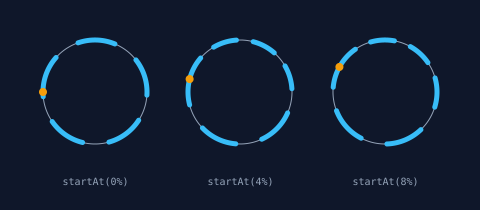
Example 6 — startAt() slides the pattern
A dash pattern begins at its path's start point. startAt(t)
re-anchors a closed path to begin at fraction t — seamlessly, the
old seam healed — so chaining startAt(phase).dash(...) marches the
whole pattern around the ring. The amber dot on each ring is the
re-anchored start point, read straight off startPoint. Percent
literals read naturally: startAt(8%) is startAt(0.08), and the
phases here are 0%, 4%, 8%.
//-- startAt(t) re-anchors a closed path's start point, and the dash
//-- pattern starts wherever the path does — so sliding the start slides
//-- every dash. Three phases of the same ring.

define ViewBox(0, 0, 480, 210);

let bg = PathLayer('bg') #{
  fill: #0f172a;
  stroke: none;
};
layer('bg').apply {
  rect(0, 0, 480, 210);
}

let scene = GroupLayer('scene') #{};
let startDots = PathLayer('start-dots') #{
  fill: #f59e0b;
  stroke: none;
};
let rings = PathLayer('rings') #{
  stroke: #94a3b850;
  stroke-width: 1;
  fill: none;
};
let marchers = PathLayer('marchers') #{
  stroke: #38bdf8;
  stroke-width: 5;
  stroke-linecap: round;
  fill: none;
};
let labels = TextLayer('labels') #{
  font-family: monospace;
  font-size: 10;
  fill: #94a3b8;
  text-anchor: middle;
};
scene.append(rings, marchers, startDots, labels);

let ring = @{
  circle(0, 0, 52);
};

let phases = [
  0%,
  4%,
  8%,
];
let phaseLabels = [
  '0%',
  '4%',
  '8%',
];
let anchors = [
  95,
  240,
  385,
];

for ([phase, columnIndex] in phases) {
  let anchorX = anchors[columnIndex];
  rings.apply {
    M anchorX 92 ring.draw()
  }
  let anchored = ring.startAt(phase);
  let pieces = anchored.dash(#{
    stroke-dasharray: 24 17;
  });
  for (piece in pieces) {
    if (piece.kind == 'dash') {
      marchers.apply {
        M anchorX 92 piece.path.draw()
      }
    }
  }
  // The amber dot marks where the re-anchored path now begins.
  startDots.apply {
    circle(calc(anchorX + anchored.startPoint.x), calc(92 + anchored.startPoint.y), 4);
  }
  labels.apply {
    text(anchorX, 185)`startAt(${phaseLabels[columnIndex]})`;
  }
}
Where to go next
The next three posts each take one craft built on interrupted lines
and build a real artifact with this toolkit:
sashiko stitch patterns, where the dash
is the craft; leather stitch holes,
where matched seams must agree hole-for-hole; and
stencil bridges, where the gaps are the
engineering. The full reference for everything here lives in the
Stroke Geometry documentation —
including pieces this post skipped: stroke-dashoffset,
dash-seam: merge for closed-path seams, and percentage dash entries,
which in Pathogen mean a fraction of this path's length rather than
SVG's viewport diagonal.